
搜索到
2
篇与
的结果
-
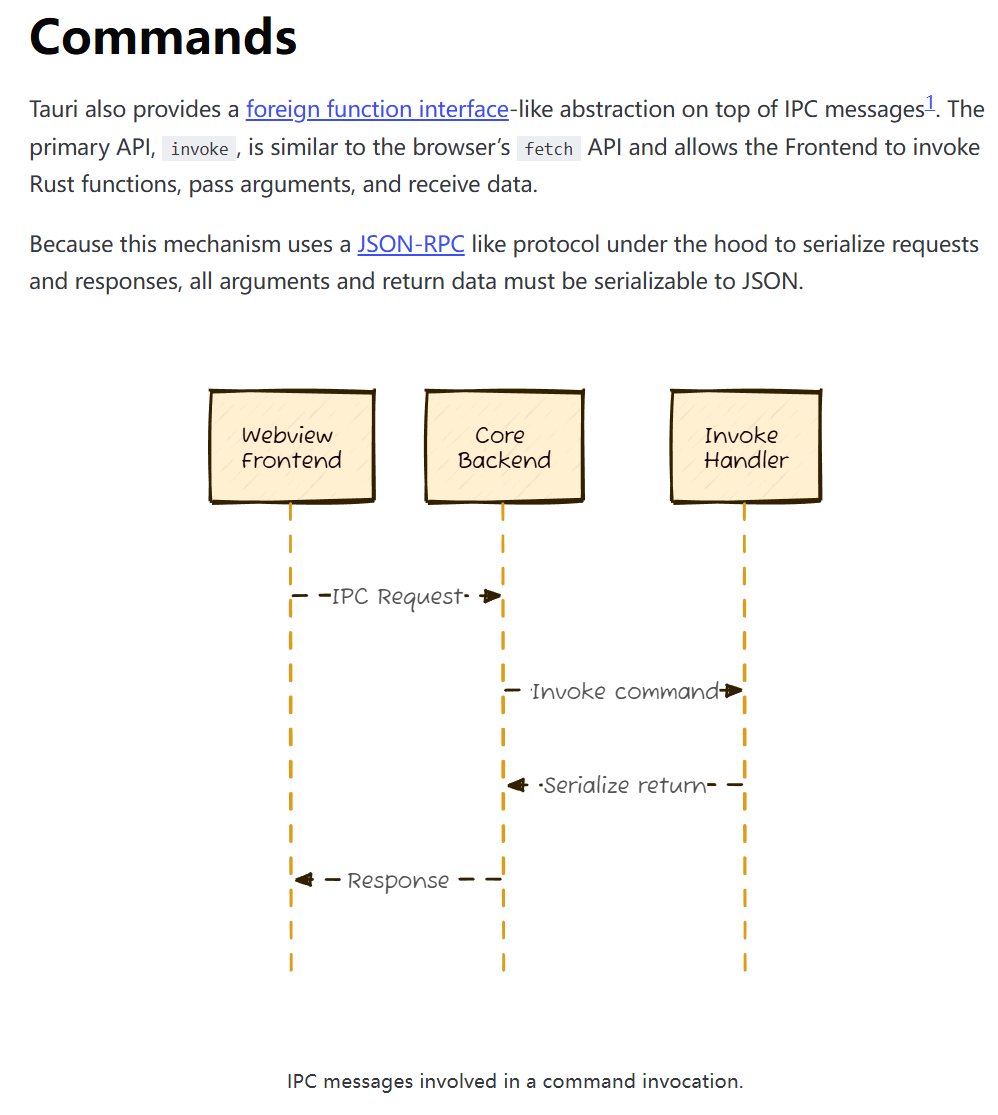
 构建前后端service层——从tauri-plugin-sql重构到seaorm #3 回顾前文seaorm迁移初体验——从tauri-plugin-sql重构到seaorm #1 数据库迁移脚本构建数据库repository层——从tauri-plugin-sql重构到seaorm #2使用tauri::command构建后端service层写好了repository层,显然前端没法直接调用这些curd操作,传统的前后端架构往往都需要通过写一些HTTP接口来实现前后端通信,而在Tauri应用中,可以利用tauri::command宏来简化这个过程。tauri::command允许我们通过进程间通信的方式,将Rust函数暴露给前端调用,从而实现前后端的数据交互。一个tauri command的示例:/// 插入游戏数据(包含关联数据) #[tauri::command] pub async fn insert_game_with_related( db: State<'_, DatabaseConnection>, game: InsertGameData, bgm: Option<BgmDataInput>, vndb: Option<VndbDataInput>, other: Option<OtherDataInput>, ) -> Result<i32, String> { GamesRepository::insert_with_related(&db, game, bgm, vndb, other) .await .map_err(|e| format!("插入游戏数据失败: {}", e)) };lib.rs中注册command写好了一个tauri command之后,还需要在lib.rs中注册这个command,才能让Tauri应用识别它:tauri::Builder::default() .invoke_handler(tauri::generate_handler![ insert_game_with_related, // 其他command... ])在前端使用invoke构建前端service层(调用command)在前端,我们可以通过Tauri提供的invoke方法来调用后端暴露的command,从而实现前后端的数据交互。我们可以将这些调用封装成一个service层,方便在应用中使用。由于command较多,如果一个command就写一个函数,那前端service层会显得非常臃肿,因此我们可以将相关的command进行分类,以及使用OOP的编程思想,将相关的command封装到一个类中。基础Service类:// 统一处理错误 export class BaseService { protected async invoke<T>( command: string, args?: Record<string, unknown>, ): Promise<T> { try { const result = await invoke<T>(command, args); return result; } catch (error) { console.error(`[Service Error] ${command}:`, error); throw error; } } }GameService类:class GameService extends BaseService { /** * 插入游戏数据(包含关联数据) */ async insertGame( game: RawGameData, bgm?: BgmData | null, vndb?: VndbData | null, other?: OtherData | null, ): Promise<number> { return this.invoke<number>("insert_game_with_related", { game, bgm: bgm || null, vndb: vndb || null, other: other || null, }); } //...更多的方法 }insertGame方法调用示例:import { gameService } from "@/services"; addGame: async (fullgame: FullGameData) => { try { if (isTauri()) { await gameService.insertGame( fullgame.game, fullgame.bgm_data, fullgame.vndb_data, fullgame.other_data, ); } else { insertGameLocal(fullgame); } // 使用通用刷新函数 await get().refreshGameData(); } catch (error) { console.error("Error adding game:", error); } },结语至此,完成了从tauri-plugin-sql重构到seaorm的重构工作。前端的职责变回了纯粹的UI展示和交互逻辑,后端则专注于数据库curd和部分底层功能逻辑。通过这种清晰的分层架构,代码的可维护性和扩展性都得到了显著提升。
 -
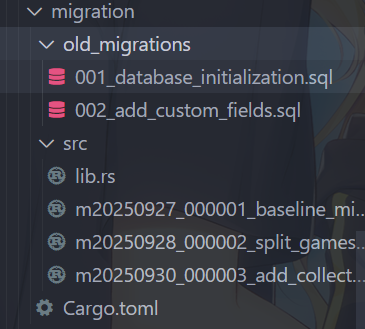
seaorm迁移初体验——从tauri-plugin-sql重构到seaorm #1 数据库迁移脚本 前言随着reinamanager的逐步开发,我发现games表实在太臃肿了,为了以后能更好的,添加新的数据源、交叉显示游戏数据、发挥各数据源的特性等,于是我决定把games表拆分成多个表;由于项目初期使用了tauri-plugin-sql插件,games表拆分后会导致repository层多个game数据表的交互逻辑变得异常复杂,换言之就是sql语句会变得很复杂。再加上之前有人建议我使用orm代替纯sql查询issue。那就来吧!要说rust家族里的orm,那肯定首推seaorm。使用sea-orm-cli生成实体安装sea-orm-clicargo install sea-orm-cli使用sea-orm-cli生成实体sea-orm-cli generate entity -u "sqlite:path/to/your/database.db" -o src-tauri/entity --with-serde both追平与基线迁移原来使用的是tauri-plugin-sql,想彻底重构到seaorm得做基线迁移,在基线迁移脚本中判断用户类型,新用户运行数据库初始化函数,创建全新的数据库结构,老用户先运行旧的迁移脚本(追平),然后将旧的迁移表_sqlx_migrations备份一份,以完成基线迁移。使用sea-orm-migration来创建一个迁移crate:sea-orm-cli migrate init sea-orm-cli migrate generate xxx因为旧的迁移脚本是基于sqlx的,还有数据库放在AppData下,所以为migration crate添加sqlx、dirs-next、url等依赖:[dependencies] sqlx = { version = "0.8", features = [ "sqlite", "runtime-tokio-native-tls", "migrate", ] } dirs-next = "2" url = "2"基线迁移脚本:use sea_orm::{ConnectionTrait, DatabaseBackend, Statement}; use sea_orm_migration::prelude::*; use sea_orm_migration::sea_orm::TransactionTrait; # [derive(DeriveMigrationName)] pub struct Migration; # [async_trait::async_trait] impl MigrationTrait for Migration { async fn up(&self, manager: &SchemaManager) -> Result<(), DbErr> { let conn = manager.get_connection(); // 开启事务,保证所有操作的原子性 let txn = conn.begin().await?; // 判断是否为新用户 - 检查是否存在任何遗留数据表 let is_new_user = !has_any_legacy_tables(&txn).await?; if is_new_user { println!("[MIGRATION] New user detected, creating modern split table structure"); create_modern_schema(&txn).await?; } else { println!("[MIGRATION] Existing user detected, running legacy migration catch-up"); run_legacy_migrations_with_sqlx().await?; } // 提交事务 txn.commit().await?; println!("[MIGRATION] v1 baseline schema created successfully"); Ok(()) } } /// 检查是否存在任何遗留数据表或数据 async fn has_any_legacy_tables<C>(conn: &C) -> Result<bool, DbErr> where C: ConnectionTrait, { // 检查是否存在 tauri-plugin-sql 的迁移表 let legacy_migration_exists = conn .query_one(Statement::from_string( DatabaseBackend::Sqlite, "SELECT 1 FROM sqlite_master WHERE type='table' AND name='_sqlx_migrations'", )) .await? .is_some(); Ok(legacy_migration_exists) } /// 为新用户创建现代的拆分表结构 async fn create_modern_schema<C>(conn: &C) -> Result<(), DbErr> where C: ConnectionTrait, { ...... // 5. 创建关联表 create_related_tables(conn).await?; // 6. 创建现代结构的索引 create_modern_indexes(conn).await?; Ok(()) } /// 创建关联表(游戏会话、统计、存档等) async fn create_related_tables<C>(conn: &C) -> Result<(), DbErr> where C: ConnectionTrait, { ...... Ok(()) } /// 为现代拆分结构创建索引 async fn create_modern_indexes<C>(conn: &C) -> Result<(), DbErr> where C: ConnectionTrait, { let indexes = [ // games 表索引 ...... ]; for (index_name, table_name, column_name) in &indexes { conn.execute(Statement::from_string( DatabaseBackend::Sqlite, format!( r#"CREATE INDEX IF NOT EXISTS "{}" ON "{}" ("{}")"#, index_name, table_name, column_name ), )) .await?; } Ok(()) } /// 为现有用户运行旧的 tauri-plugin-sql 迁移,使用 sqlx 执行 async fn run_legacy_migrations_with_sqlx() -> Result<(), DbErr> { println!("[MIGRATION] Running legacy migrations with sqlx..."); // 获取数据库连接 URL(从系统目录推导) let database_url = get_db_path()?; // 创建 sqlx 连接池 let pool = sqlx::SqlitePool::connect(&database_url) .await .map_err(|e| DbErr::Custom(format!("Failed to connect with sqlx: {}", e)))?; // 检查并运行旧迁移 run_legacy_migration_001(&pool).await?; run_legacy_migration_002(&pool).await?; // 清理 sqlx 的迁移记录,因为我们转移到 SeaORM cleanup_sqlx_migration_table(&pool).await?; pool.close().await; println!("[MIGRATION] Legacy migrations completed successfully"); Ok(()) } /// 从系统目录推导数据库连接字符串(无需外部参数) fn get_db_path() -> Result<String, DbErr> { use std::path::PathBuf; // 使用 config_dir (Roaming on Windows) 来匹配原先的 app_data_dir 行为 let base = dirs_next::config_dir() .or_else(dirs_next::data_dir) .ok_or_else(|| DbErr::Custom("Failed to resolve user data directory".to_string()))?; let db_path: PathBuf = base .join("com.reinamanager.dev") .join("data") .join("reina_manager.db"); // 使用 url::Url::from_file_path 保证路径格式正确 let db_url = url::Url::from_file_path(&db_path) .map_err(|_| DbErr::Custom("Invalid database path".to_string()))?; let conn = format!("sqlite:{}?mode=rwc", db_url.path()); Ok(conn) } /// 运行旧迁移 001 - 数据库初始化 async fn run_legacy_migration_001(pool: &sqlx::SqlitePool) -> Result<(), DbErr> { println!("[MIGRATION] Checking legacy migration 001..."); // 检查是否已经执行过这个迁移 let migration_exists = sqlx::query_scalar::<_, i64>("SELECT COUNT(*) FROM _sqlx_migrations WHERE version = 1") .fetch_one(pool) .await .unwrap_or(0) > 0; if migration_exists { println!("[MIGRATION] Migration 001 already applied, skipping"); return Ok(()); } println!("[MIGRATION] Applying migration 001 - database initialization"); // 执行迁移 001 的 SQL let migration_sql = include_str!("../old_migrations/001_database_initialization.sql"); sqlx::query(migration_sql) .execute(pool) .await .map_err(|e| DbErr::Custom(format!("Failed to execute migration 001: {}", e)))?; // 记录迁移 sqlx::query( "INSERT INTO _sqlx_migrations (version, description, installed_on, success, checksum, execution_time) VALUES (1, 'database_initialization', datetime('now'), 1, 0, 0)" ) .execute(pool) .await .map_err(|e| DbErr::Custom(format!("Failed to record migration 001: {}", e)))?; println!("[MIGRATION] Migration 001 applied successfully"); Ok(()) } /// 运行旧迁移 002 - 添加自定义字段 async fn run_legacy_migration_002(pool: &sqlx::SqlitePool) -> Result<(), DbErr> { println!("[MIGRATION] Checking legacy migration 002..."); // 检查是否已经执行过这个迁移 let migration_exists = sqlx::query_scalar::<_, i64>("SELECT COUNT(*) FROM _sqlx_migrations WHERE version = 2") .fetch_one(pool) .await .unwrap_or(0) > 0; if migration_exists { println!("[MIGRATION] Migration 002 already applied, skipping"); return Ok(()); } println!("[MIGRATION] Applying migration 002 - add custom fields"); // 执行迁移 002 的 SQL let migration_sql = include_str!("../old_migrations/002_add_custom_fields.sql"); sqlx::query(migration_sql) .execute(pool) .await .map_err(|e| DbErr::Custom(format!("Failed to execute migration 002: {}", e)))?; // 记录迁移 sqlx::query( "INSERT INTO _sqlx_migrations (version, description, installed_on, success, checksum, execution_time) VALUES (2, 'add_custom_fields', datetime('now'), 1, 0, 0)" ) .execute(pool) .await .map_err(|e| DbErr::Custom(format!("Failed to record migration 002: {}", e)))?; println!("[MIGRATION] Migration 002 applied successfully"); Ok(()) } /// 清理 sqlx 的迁移记录表,为转移到 SeaORM 做准备 async fn cleanup_sqlx_migration_table(pool: &sqlx::SqlitePool) -> Result<(), DbErr> { println!("[MIGRATION] Cleaning up sqlx migration records..."); // 可选:保留迁移历史但重命名表 sqlx::query("ALTER TABLE _sqlx_migrations RENAME TO _legacy_sqlx_migrations") .execute(pool) .await .map_err(|e| DbErr::Custom(format!("Failed to rename sqlx migrations table: {}", e)))?; println!("[MIGRATION] sqlx migration table renamed to _legacy_sqlx_migrations"); Ok(()) }games表拆分先关闭外键约束,再创建新的核心games表,创建各个数据源的数据表,以及一个other_data表用于存放一些通用数据,其次用旧的games表数据填充新的数据表,然后备份、删除并重建受外键影响的表,再然后删除原games表并重命名新表,最后重新开启外键约束,重建数据库以回收空间并整理碎片。games表拆分脚本:use sea_orm::{ConnectionTrait, DatabaseBackend, Statement}; use sea_orm_migration::prelude::*; use sea_orm_migration::sea_orm::TransactionTrait; #[derive(DeriveMigrationName)] pub struct Migration; #[async_trait::async_trait] impl MigrationTrait for Migration { async fn up(&self, manager: &SchemaManager) -> Result<(), DbErr> { // 检查是否已经拆分(通过检查 bgm_data 表是否存在) let already_split = manager.has_table("bgm_data").await?; if already_split { // 已经拆分过,直接返回 return Ok(()); } // 执行表拆分逻辑 split_games_table(manager).await?; Ok(()) } } async fn split_games_table(manager: &SchemaManager<'_>) -> Result<(), DbErr> { let conn = manager.get_connection(); // 0. 关闭外键约束 conn.execute(Statement::from_string( DatabaseBackend::Sqlite, "PRAGMA foreign_keys = OFF;", )) .await?; // 开启事务,保证所有操作的原子性 let txn = conn.begin().await?; // 1. 创建新的核心 games 表(只保留本地管理相关字段) // 2. 创建 BGM 数据表 // 3. 创建 VNDB 数据表 // 4. 创建其他数据表 // 5. 迁移数据从原 games 表到新表结构 // 5.1 迁移核心 games 数据 // 5.2 迁移 BGM 相关数据 // 5.3 迁移 VNDB 相关数据 // 5.4 迁移其他数据(custom, Whitecloud 等) // 6. 备份、删除并重建受外键影响的表 // 6.1 处理 game_sessions 表 // 6.2 处理 game_statistics 表 // 6.3 处理 savedata 表 // 7. 删除原 games 表并重命名新表 // 8. 提交事务 txn.commit().await?; // 9. 重新开启外键约束 conn.execute(Statement::from_string( DatabaseBackend::Sqlite, "PRAGMA foreign_keys = ON;", )) .await?; // 10. (推荐) 重建数据库以回收空间并整理碎片 conn.execute_unprepared("VACUUM;").await?; Ok(()) }相比tauri-plugin-sql的sql式迁移脚本,seaorm的rust迁移脚本可太好用了好吧。迁移代码详情见migration相关联的下一篇文章构建前后端service层——从tauri-plugin-sql重构到seaorm #2